
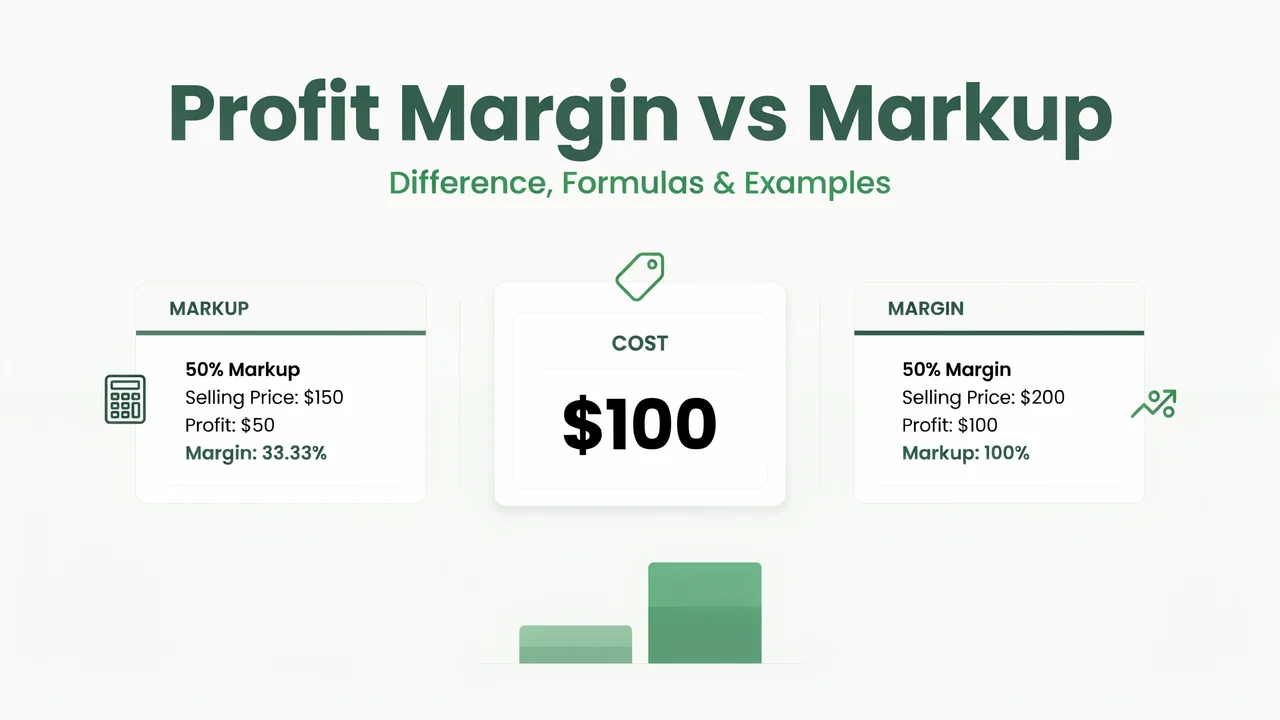
Profit Margin vs Markup: Difference, Formulas and Examples
Profit margin and markup both describe profit, but they measure that profit against different numbers.
Profit margin measures profit as a percentage of the selling price. Markup measures profit as a percentage of cost. That difference is why the two percentages are not the same.
For example, suppose an item costs $50 and sells for $75.
Profit:
$75 − $50 = $25
Markup:
$25 ÷ $50 × 100 = 50%
Profit margin:
$25 ÷ $75 × 100 = 33.33%
The profit is still $25 in both cases. The percentage changes because markup uses cost as the base, while margin uses the selling price.
If you want to work with your own numbers, use the Profit Margin Calculator or Markup Calculator.
Profit Margin vs Markup at a Glance
| Comparison | Profit Margin | Markup |
|---|---|---|
| Based on | Selling price | Cost |
| Formula | Profit ÷ Selling Price × 100 | Profit ÷ Cost × 100 |
| Main purpose | Measure gross profitability | Measure how much was added to cost |
| Example with $50 cost and $75 price | 33.33% | 50% |
| Can normally exceed 100%? | No, with positive cost and revenue | Yes |
The easiest way to understand the difference between margin and markup is to remember the base used in each formula.
Margin uses the selling price. Markup uses the original cost.
The Main Difference Between Margin and Markup
Both calculations begin with the same profit amount.
Profit = Selling Price − Cost
The difference comes from what that profit is divided by.
Margin Uses the Selling Price
Profit margin measures the share of the selling price that remains as gross profit.
The formula is:
Profit Margin % = (Selling Price − Cost) ÷ Selling Price × 100
Suppose a product costs $80 and sells for $120.
Profit:
$120 − $80 = $40
Margin:
$40 ÷ $120 × 100 = 33.33%
This means 33.33% of the selling price is gross profit before other business expenses are considered.
Markup Uses Cost
Markup measures profit against the original cost.
The formula is:
Markup % = (Selling Price − Cost) ÷ Cost × 100
Using the same numbers:
Cost = $80
Selling price = $120
Profit = $40
Markup:
$40 ÷ $80 × 100 = 50%
So the same sale has:
- 33.33% margin
- 50% markup
For the same profitable sale with a positive cost, the markup percentage is higher because it uses the smaller base.
Profit Margin Formula With an Example
Suppose an item costs $90 and sells for $150.
First calculate the profit:
$150 − $90 = $60
Now divide the profit by the selling price:
$60 ÷ $150 × 100 = 40%
The profit margin is 40%.
The general formula is:
Profit Margin % = Profit ÷ Selling Price × 100
You can also write it as:
Profit Margin % = (Selling Price − Cost) ÷ Selling Price × 100
For your own numbers, use the Profit Margin Calculator.
Markup Formula With the Same Example
Keep the same example:
- Cost: $90
- Selling price: $150
- Profit: $60
Markup:
$60 ÷ $90 × 100 = 66.67%
So the same transaction produces:
- 40% margin
- 66.67% markup
The markup formula is:
Markup % = Profit ÷ Cost × 100
or:
Markup % = (Selling Price − Cost) ÷ Cost × 100
If you need to calculate markup from cost and selling price, use the Markup Calculator.
Why a 30% Markup Is Not a 30% Margin
A common pricing mistake is assuming a 30% markup produces a 30% margin.
It does not.
Suppose the cost is $100.
If You Add a 30% Markup
Selling price:
$100 × 1.30 = $130
Profit:
$130 − $100 = $30
Margin:
$30 ÷ $130 × 100 = 23.08%
So a 30% markup gives a margin of only 23.08%.
If You Want a 30% Margin
To reach a 30% margin, use:
Selling Price = Cost ÷ (1 − Margin)
Enter the percentage as a decimal:
$100 ÷ (1 − 0.30)
$100 ÷ 0.70 = $142.86
That means:
- 30% markup gives a selling price of $130
- 30% margin requires a selling price of $142.86
The difference is $12.86 per unit.
This is why businesses need to be clear about whether a pricing target refers to markup or margin.
How to Convert Markup to Margin
If you already know the markup percentage, you can convert it to margin without knowing the original cost or selling price.
Use:
Margin = Markup ÷ (1 + Markup)
Suppose the markup is 50%.
Convert 50% to decimal form:
0.50
Now calculate:
0.50 ÷ 1.50 = 0.3333
Convert the result back to a percentage:
33.33% margin
So:
50% markup = 33.33% margin
How to Convert Margin to Markup
To convert margin into markup, use:
Markup = Margin ÷ (1 − Margin)
Suppose the target margin is 40%.
Convert 40% to decimal form:
0.40
Now calculate:
0.40 ÷ 0.60 = 0.6667
Convert that to a percentage:
66.67% markup
So:
40% margin = 66.67% markup
Margin and Markup Conversion Table
Here are some common markup percentages and their equivalent margins.
| Markup | Equivalent Margin |
|---|---|
| 10% | 9.09% |
| 20% | 16.67% |
| 25% | 20.00% |
| 33.33% | 25.00% |
| 50% | 33.33% |
| 75% | 42.86% |
| 100% | 50.00% |
| 150% | 60.00% |
| 200% | 66.67% |
If you start with a target margin instead, the required markup looks like this:
| Target Margin | Required Markup |
|---|---|
| 10% | 11.11% |
| 20% | 25.00% |
| 25% | 33.33% |
| 30% | 42.86% |
| 33.33% | 50.00% |
| 40% | 66.67% |
| 50% | 100.00% |
| 60% | 150.00% |
The higher the target percentage becomes, the larger the gap between margin and markup.
When Should You Use Margin and When Should You Use Markup?
Margin and markup answer different business questions.
Use Margin When You Want to Measure Profitability
Margin helps answer:
How much of the selling price remains as gross profit?
It is useful when reviewing:
- gross profitability
- revenue performance
- pricing performance
- cost changes
- financial reports
Use Markup When You Are Building a Price From Cost
Markup helps answer:
How much should be added above cost?
It is useful when:
- setting a selling price
- applying a pricing rule
- preparing quotes
- comparing price with acquisition cost
- pricing products from known cost
A business may use both measures because they describe different sides of the same sale.
Gross Profit Margin vs Markup
In most pricing discussions, the word “margin” refers to gross profit margin.
Gross profit is:
Gross Profit = Sales − Cost of Goods Sold
Gross profit margin is:
Gross Margin % = Gross Profit ÷ Sales × 100
Markup is:
Markup % = Gross Profit ÷ Cost × 100
The difference is still the denominator.
Gross margin uses sales.
Markup uses cost.
Gross margin should also not be confused with net profit margin.
Net profit margin takes a wider range of business expenses into account, while gross margin focuses mainly on sales and the cost of goods sold.
Why Markup Can Exceed 100% but Margin Usually Cannot
Markup and margin also differ in their possible range.
Suppose:
- Cost = $50
- Selling price = $150
- Profit = $100
Markup:
$100 ÷ $50 × 100 = 200%
Margin:
$100 ÷ $150 × 100 = 66.67%
The markup is 200%, but the margin is only 66.67%.
With a normal sale where both cost and revenue are positive, gross profit remains below the selling price. Because of that, gross margin stays below 100%.
Markup can go above 100% because the profit can be greater than the original cost.
Common Margin and Markup Mix-Ups
Treating 50% Markup as 50% Margin
A 50% markup is not the same as a 50% margin.
For example:
Cost = $100
50% markup = $50
Selling price:
$150
Profit:
$50
Margin:
$50 ÷ $150 × 100 = 33.33%
A true 50% margin would require a selling price of $200.
Adding the Target Margin Directly to Cost
If the target is a 30% margin, multiplying cost by 1.30 gives a 30% markup, not a 30% margin.
For a 30% margin, use:
Selling Price = Cost ÷ 0.70
Using an Incomplete Cost Figure
Markup and margin depend on the cost figure being used.
If important costs are left out, the resulting percentage may not reflect the economics of the sale accurately.
Confusing Gross Margin With Net Margin
Gross margin focuses on sales and cost of goods sold.
Net margin considers a wider range of expenses.
A business can have a healthy gross margin while having a much lower net margin after operating expenses are considered.
A Simple Way to Remember Margin vs Markup
Use these two questions:
Markup: How much did I add to cost?
Margin: How much of the selling price is gross profit?
A simple memory shortcut is:
Markup starts with cost. Margin measures against sales.
If you remember which base each formula uses, the difference becomes much easier to understand.
Frequently Asked Questions
Is markup the same as profit margin?
No. Markup measures profit against cost, while profit margin measures profit against the selling price.
Is a 50% markup equal to a 50% margin?
No. A 50% markup is equal to about a 33.33% margin. A 50% margin requires a 100% markup.
What markup gives a 30% margin?
A 30% margin requires approximately 42.86% markup.
Formula:
0.30 ÷ (1 − 0.30) = 0.4286
What markup gives a 40% margin?
A 40% margin requires approximately 66.67% markup.
What markup gives a 50% margin?
A 50% margin requires a 100% markup.
For example, a product costing $100 would need to sell for $200.
Can markup be over 100%?
Yes. Markup can exceed 100% when the profit is greater than the original cost.
Can gross profit margin exceed 100%?
For a normal sale with positive cost and positive revenue, gross profit margin remains below 100%.
Why is markup higher than margin?
Markup divides profit by cost, while margin divides the same profit by the higher selling price. That smaller denominator makes the markup percentage larger.
Is gross profit margin the same as markup?
No.
Gross margin compares gross profit with sales. Markup compares gross profit with cost.
Margin and Markup Are Different Views of the Same Sale
The main difference in profit margin vs markup is the number used as the base.
Markup = Profit ÷ Cost
Margin = Profit ÷ Selling Price
Markup helps show how far the selling price sits above cost.
Margin helps show how much of the selling price remains as gross profit.
Keeping those two ideas separate helps prevent pricing mistakes and makes both calculations easier to understand.
If you also need to determine how much revenue or how many units are required to cover fixed and variable costs, use the Break-Even Calculator.
Sources Used for Fact Checking
- Business Victoria
- Xero
- Zoho Inventory Academy
- AccountingCoach
2 Comments